A Simple Guide for Businesses, Professionals, and Curious Beginners
Artificial intelligence is no longer a future trend that businesses are “starting to explore.” It is already part of daily work across marketing, operations, customer service, research, sales, management, and software development. Companies now use AI to write content, summarize reports, analyze information, answer internal questions, support employees, speed up research, and reduce repetitive work.
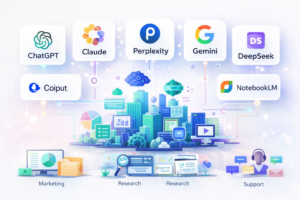
For many people, however, the AI market still feels crowded and confusing. Names like ChatGPT, Claude, Microsoft Copilot, Google Gemini, Perplexity, DeepSeek, and NotebookLM appear constantly in articles, videos, and business discussions, but they are often presented as if they all do the same thing. They do not.
At a glance, these platforms may all look like “AI chatbots.” In reality, companies choose them for very different reasons. Some are used because they are flexible and easy to adopt. Others are chosen for long-document analysis, source-backed research, Office or Google integration, lower technical cost, or stronger document-grounded answers.
That is the most important idea to understand before comparing any platform: the best AI tool is not simply the most famous one. It is the one that best matches the kind of work a company needs to improve.
Gartner predicts that by the end of 2026, 40% of enterprise applications will be integrated with task-specific AI agents, showing how quickly business AI tools are evolving toward specialized business workflows.
Some businesses want a broad assistant that can help many teams at once. Others want an AI system tightly integrated into the software employees already use every day. Others care most about privacy, research quality, citations, or the ability to work directly from internal documents.
This guide explains the most important AI tools used in business today in simple language. It covers what each platform does, why businesses choose it, its typical cost, whether a free version exists, and which organizations benefit most from each tool.
A quick walkthrough of ChatGPT, Claude, Copilot, Gemini, Perplexity, DeepSeek, and NotebookLM—and how companies decide which one to use.
Video Overview
Which AI Tool Is Best for Different Business Needs?
Video Overview: The Most Important AI Tools for Business
https://youtu.be/v3XcpQWIQQ
This overview video was created using Google’s NotebookLM, an AI research tool that, among other things, can transform documents and notes into narrated explanations and summaries.
Quick Comparison of Major AI Platforms
| AI Tool | Official Site | Free Version | Typical Paid Cost | Main Business Strength | Why Companies Choose It |
|---|---|---|---|---|---|
| ChatGPT | chat.openai.com | Yes | About $20+/month | Versatile general assistant | Broad usefulness across writing, research, coding, and support. OpenAI’s ChatGPT Enterprise overview |
| Claude | claude.ai | Yes | About $20+/month | Long documents and nuanced reasoning | Strong analysis, careful writing, safety-oriented behavior. Anthropic’s Claude for Work |
| Microsoft Copilot | copilot.microsoft.com | Limited options | About $30/user/month | Microsoft 365 productivity | Best fit for companies already using Word, Excel, Outlook, and Teams. Microsoft Copilot for Business |
| Google Gemini | gemini.google.com | Yes | Free / Workspace tiers | Google ecosystem integration | Natural fit for Google Workspace users. Gemini for Google Workspace |
| Perplexity AI | perplexity.ai | Yes | About $20/month | Research with citations | Strong verification and transparent sources. Perplexity Enterprise |
| DeepSeek | deepseek.com | Yes | Free / low API cost | Coding and technical reasoning | Popular among developers and startups. DeepSeek API |
| NotebookLM | notebooklm.google |
Yes | Free / Workspace options | Document-grounded research | Best for answers based on uploaded documents. NotebookLM |
One helpful way to understand the AI market is by role.
ChatGPT and Claude function as general AI assistants.
Copilot and Gemini act as ecosystem assistants embedded into workplace software.
Perplexity serves as a research assistant with source transparency.
DeepSeek focuses on technical reasoning and coding performance.
NotebookLM specializes in document-grounded knowledge management.
Because these tools serve different purposes, businesses rarely choose between identical products.
Why Most Companies Use Multiple AI Tools
A common misconception is that organizations choose a single AI platform for all tasks. In practice, many companies use several tools depending on the workflow.
A team might rely on ChatGPT for writing and brainstorming, Claude for long-form document analysis, Perplexity for research with citations, NotebookLM for internal knowledge management, Copilot for Microsoft productivity tools, and DeepSeek for coding tasks.
Industry platforms like G2’s AI tools marketplace demonstrate how companies often combine multiple AI solutions rather than relying on a single system.
Instead of asking Which AI tool is best?, companies typically ask:
Which AI tool is best for this specific type of work?
Once that question is clear, selecting the right platform becomes easier.
ChatGPT for Business: A Versatile Starting Point
Official website:
chat.openai.com
For many businesses, ChatGPT is the first step into practical AI adoption. It is widely recognized because it supports a broad range of tasks.
Companies use ChatGPT to:
- draft blog posts and marketing copy
- summarize reports and meetings
- brainstorm ideas and strategies
- support customer service teams
- generate coding suggestions
- explain technical concepts
Because it works across many departments, ChatGPT often becomes the first AI tool employees experiment with.
Why Companies Choose ChatGPT
The biggest advantage is versatility. One platform can assist marketing teams, managers, analysts, and developers without requiring complex training.
Another reason is ease of adoption. The conversational interface makes it accessible to non-technical users.
Finally, the OpenAI ecosystem allows companies to expand AI capabilities through APIs and enterprise solutions such as ChatGPT Enterprise.
Cost and Free Version
ChatGPT offers a free version and paid plans starting around $20 per month, with enterprise options available.
Best Fit
ChatGPT is ideal for organizations seeking a flexible AI assistant that improves productivity across multiple departments.
Limitations
As with all AI systems, outputs should still be reviewed when accuracy is critical.
Claude for Business: Strong in Document Analysis
Official website:
claude.ai
Claude, developed by Anthropic, has become popular among professionals who need AI systems capable of deep reasoning and long-document analysis.
Many organizations use Claude to review contracts, analyze reports, summarize research papers, and process complex documents.
Why Companies Choose Claude
Claude performs well when dealing with large amounts of text. Its long context window allows it to read and interpret extensive materials while maintaining coherent reasoning.
Many professionals also appreciate Claude’s analytical writing style and safety-focused design principles.
Anthropic highlights enterprise use cases in Claude for Work.
Cost and Free Version
Claude offers a free tier along with paid plans starting around $20 per month.
Best Fit
Claude is well suited for consultants, analysts, legal teams, and professionals working with complex documentation.
Limitations
For quick drafting or casual brainstorming, simpler AI tools may be sufficient.
Microsoft Copilot for Business: Integrated With Microsoft 365
Official website:
copilot.microsoft.com
Microsoft Copilot brings AI directly into the Microsoft tools used by millions of employees every day.
Instead of opening a separate AI platform, users can access Copilot inside Word, Excel, Outlook, Teams, and PowerPoint.
Why Companies Choose Copilot
The primary advantage is seamless integration into existing workflows.
Copilot can draft documents, summarize emails, generate presentations, and analyze spreadsheet data.
Microsoft outlines many of these capabilities in Copilot for Business.
Cost
Copilot business plans generally cost around $30 per user per month.
Best Fit
Copilot is ideal for companies already heavily invested in Microsoft 365.
Google Gemini for Business: Built for Google Workspace
Official website:
gemini.google.com
Google Gemini provides AI capabilities within Google’s ecosystem, including Gmail, Docs, Sheets, Drive, and other Workspace tools.
For companies using Google Workspace as their primary collaboration environment, Gemini offers a natural extension of existing workflows.
Why Companies Choose Gemini
The biggest advantage is integration with Google’s cloud productivity tools.
Gemini also benefits from access to Google Search infrastructure, helping provide up-to-date information.
Google describes its enterprise AI strategy in Google Workspace AI solutions.
Cost
Gemini offers both free access and paid plans through Google Workspace and Gemini Advanced.
Best Fit
Organizations that rely on Google Workspace for daily collaboration.
Perplexity AI for Research
Official website:
perplexity.ai
Perplexity AI is designed primarily for research and information discovery.
Unlike many conversational AI tools, Perplexity emphasizes source citations and transparent references.
Why Companies Choose Perplexity
Businesses value Perplexity when they need verifiable research results.
Common uses include market research, competitive analysis, and industry monitoring.
Enterprise capabilities are described on Perplexity Enterprise.
Cost
Perplexity offers a free version and a paid Pro plan around $20 per month.
Best Fit
Teams conducting research, analysis, and information gathering.
DeepSeek for Technical Teams
Official website:
deepseek.com
DeepSeek gained attention for delivering strong technical performance with relatively low cost.
Developers often use DeepSeek models for coding assistance, mathematics, and logical reasoning tasks.
Why Companies Choose DeepSeek
The primary appeal is cost-efficient performance in technical workflows.
Developers and startups also appreciate the flexibility of working with models available through DeepSeek’s platform.
Cost
DeepSeek is often available through free access or low-cost API pricing.
Best Fit
Engineering teams, startups, and organizations focused on coding workflows.
NotebookLM for Knowledge Management
Official website:
notebooklm.google
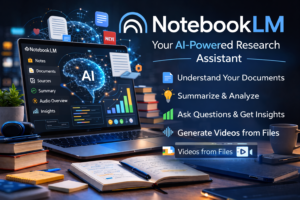
NotebookLM stands apart from other AI tools because it works directly with user-provided documents and multiple research files, allowing users to analyze information, generate summaries, and even create narrated video explanations from their materials.
The overview video earlier in this article was generated using NotebookLM, demonstrating how the platform can transform collections of documents into structured explanations and multimedia summaries.
Why Companies Choose NotebookLM
Many organizations struggle with information scattered across reports, presentations, PDFs, and internal documents.
NotebookLM turns those documents into a searchable knowledge base.
Cost
NotebookLM offers a free version for anyone with a Google account, while advanced features and higher usage limits are available through paid plans such as Google AI Pro.
Best Fit
Companies looking to organize internal knowledge and research materials.
How Companies Choose AI Tools
When evaluating AI platforms, organizations typically consider three factors.
Data and privacy requirements
Companies handling sensitive data must evaluate how each platform processes and stores information.
Existing software ecosystems
Microsoft-focused companies often prefer Copilot, while Google Workspace organizations may lean toward Gemini.
Type of work being improved
Different tools excel in different areas.
- ChatGPT for general productivity
- Claude for document analysis
- Copilot for Microsoft workflows
- Gemini for Google collaboration
- Perplexity for research
- DeepSeek for coding tasks
- NotebookLM for document knowledge systems
Analyst firms such as Forrester emphasize aligning AI tools with specific business workflows.
Why AI Adoption Continues to Accelerate
Businesses adopt AI because it delivers measurable benefits.
Companies report faster research, improved productivity, quicker decision-making, and better use of employee time.
AI does not eliminate the need for human judgment. Professionals still review outputs, ensure accuracy, and manage risks.
However, AI is increasingly becoming standard business infrastructure, similar to cloud computing, search engines, and productivity software.
Conclusion
The most important AI tools companies use today serve different purposes.
ChatGPT offers versatile productivity assistance.
Claude provides deeper reasoning and document analysis.
Microsoft Copilot integrates AI into Microsoft 365 workflows.
Google Gemini enhances collaboration inside Google Workspace.
Perplexity focuses on research with source transparency.
DeepSeek supports technical reasoning and coding tasks.
NotebookLM helps organizations manage knowledge from internal documents.
Instead of searching for a single “best” AI platform, businesses achieve the greatest value by choosing tools that match their workflows.
In many organizations, the most effective approach is combining several AI systems, each solving a different problem.
Leave a Reply